Keynote Controls
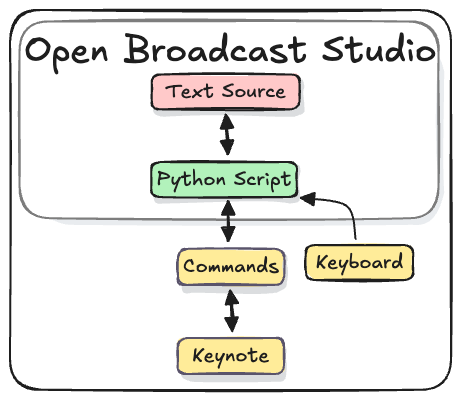
Keynote Controls is an OBS Python script that enables...
- Navigating Keynote slides with OBS hotkeys
- Syncing OBS Scene changes to Keynote slides
- Scrolling slide presenter notes in an OBS Text Source
Add the Keynote Controls Script to OBS
The "Keynote Controls" script and accompanying OBS Collection can be found on Github.
Import the Keynote Controls OBS Collection
- Download the Keynote Controls Collection
- In OBS, from the menu select
Scene Collection > Import - Import the collection
- Choose the collection
Scene Collection
Add the Keynote Controls Script
- Download the Keynote Controls Script
- In OBS, from the menu select
Tools > Scripts - Click the
+ Add scriptbutton
After installing the script, adjust the settings to the camera and slides scene.
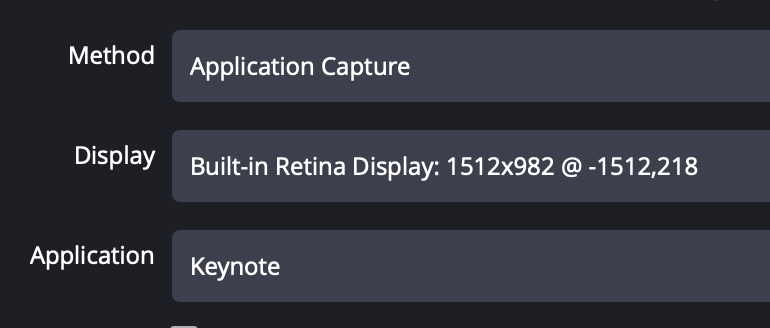
The "Slides" scene includes a "macOS Screen Capture" source to capture the Keynote slides. You can set the 'Display' as needed. Keynote needs to be on the selected display.
Using "Keynote Controls"
The script includes OBS Hotkeys.
Navigate Slides
Start Slide Show = F20
Next Slide = F13
Previous Slide = F14
Add Scene tags to slides
Slide "tags" are used to synch OBS scenes and Keynote slides.
In OBS choose a scene, then press the "Add Scene Tag" hotkey
Add Slide tag = F15
Adjust teleprompter
Increase Font Size = F16
Decrease Font Size = F17
Increase Scroll Speed = F18
Decrease Scroll Speed = F19
Configure Remote Controller
The 8-bitDo Micro controller is recommended as an optional slide clicker.
The 8-bitDo Micro has a "Keyboard" mode which turns the controller into a bluetooth keyboard. The 16 buttons can be configured with the iOS and Android app "Ultimate" from 8-bitDo.