MIDI
Drive OBS events with Musical Instrument Digital Interface (MIDI) messages.
- Set the number of connected devices
- Send messages to Text sources.
- Return messages to devices.
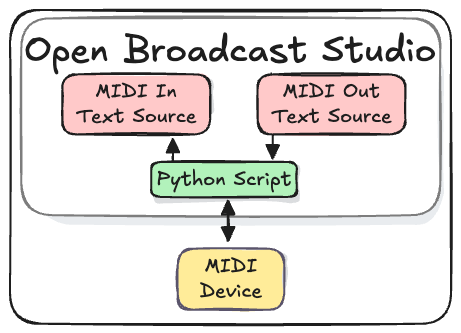
MIDI messages are received from a device. A device could be an app, like TouchOSC, or hardware, like a MIDI controller.
The User creates a text sources to store and display incoming and outgoing messages.
A text source is used because changes to a text source are easily observed by WebSocket clients. When a text source is updated an "InputSettingsChanged" event is sent to webSocket clients. See the Processing MIDI Messages tutorial for a complete example.
Install Python dependencies
This script uses the `Python rtmidi Library.
- Open the Terminal app
- Enter the
pipcommand
python3.11 -m pip install python-rtmidi
Add the MIDI io Script to OBS
The "MIDI io" script and accompanying OBS Collection can be found on Github.
python midi io repo
Import the MIDI io OBS Collection
- Download the MID io Collection
- In OBS, from the menu select
Scene Collection > Import - Import the collection
- Choose the collection
Scene Collection
Add the MIDI io Script
- Download the MIDI io Script
- In OBS, from the menu select
Tools > Scripts - Click the
+ Add scriptbutton
Configure MIDI Devices
Add MIDI Devices
Connect MIDI devices to your computer before opening OBS.
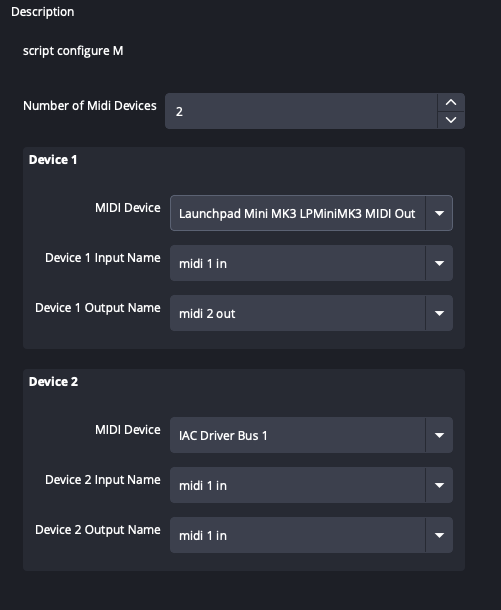
Enter the number of devices to monitor
MIDI Device: a list of available devices
Device Input Name: a Text Source to store messages coming in to OBS from the MIDI device
Device Output Name: a Text Source to store messages going out from OBS to the MIDI